Pay insurance carrier invoices
This article is for admins who need to pay insurance carrier invoices and understand how benefit deductions work.
Once your benefits start, your insurance carrier(s) will send you monthly premium invoices for your company's coverage. Pay these invoices on time to keep your group plan active. Each carrier sends invoices monthly by mail or email. Contact your insurance carrier to update your billing preferences.
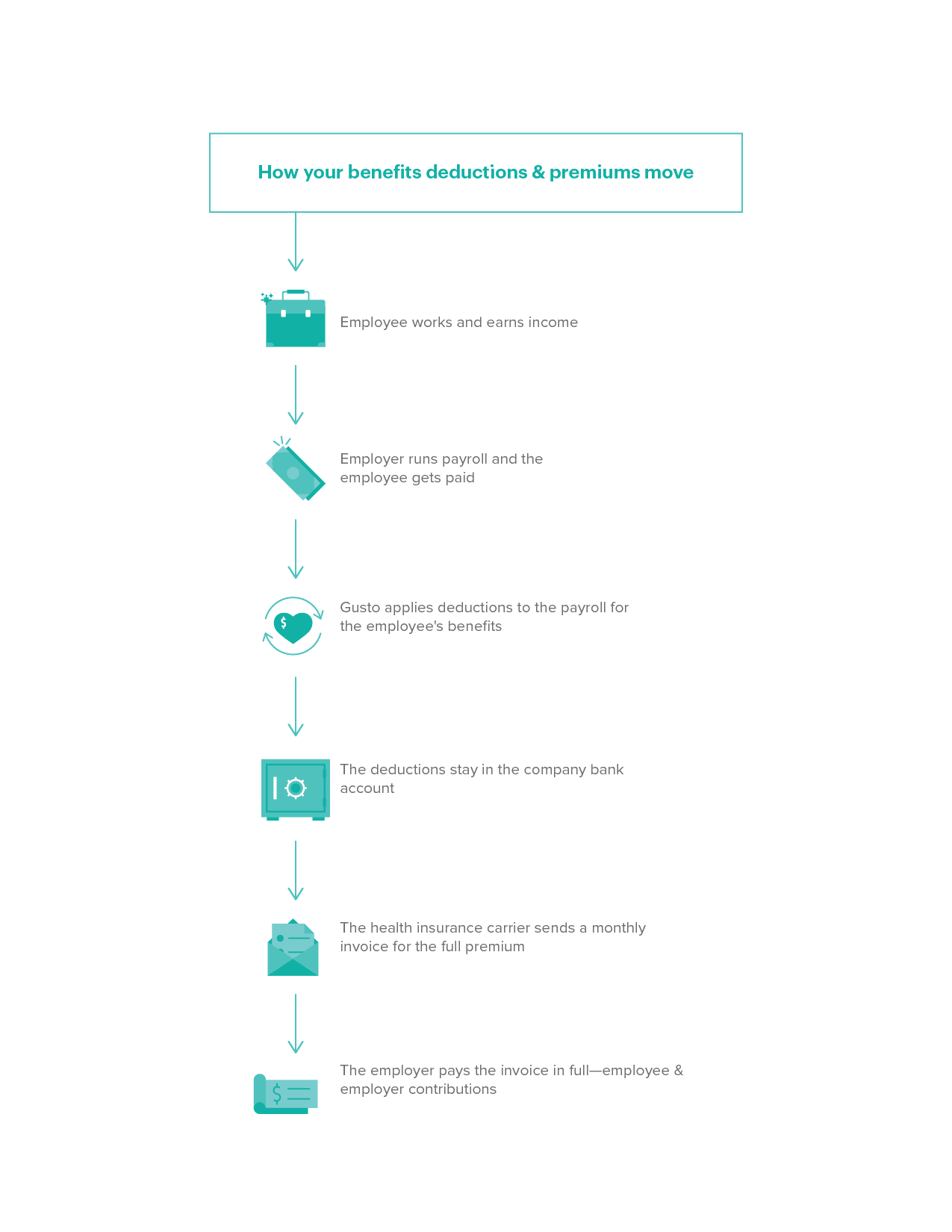
If employees contribute to their premiums, we deduct their share pre-tax from their paychecks (if you offer benefits through Gusto), or you can set up manual payroll deductions (if you offer benefits through a third party). These deductions stay in your company bank account. You can then pay the full premium amount to your carrier in one payment. Go to the How benefits deductions and premium payments work section of the article to learn more.
Health insurance carriers use two methods to determine premiums. Member-level rating uses each employee's personal details to set individual prices. Composite rating averages the price for all employees when you set up the plan and locks in that plan rate for the duration of the plan year.
Member-level rating
Carriers base rates on each employee's and dependent's age, zip code, and (in some states) smoking status. For small group insurance, carriers make these rates public, so we can tell you your exact premium before you enroll.
Composite rating
Carriers calculate the rates by averaging the rates of all participating employees. We cannot provide you with your exact premium until all employees complete open enrollment and submit their applications. The carrier then calculates the final composite rates. Once the carrier finishes, we'll tell you your premiums for the year.
In some states (like Massachusetts), carriers calculate four composite rates based on which family members enroll:
Employee only rate
Employee + spouse rate
Employee + child rate
Employee + family rate
In other states (like Washington), some carriers use just two composite rates. Each person's age determines which rate applies to them:
Over 21 years old rate
Under 21 years old rate
Questions and answers
Q: How much will the premium cost for a newly hired employee who enrolls mid-year?
A: For member-level rating, carriers calculate premiums using either the member's age and zip code on their start date or the group's start date (this varies by carrier).
For composite rating, carriers lock in rates for the year based on the group's average demographics at the start of the plan year. New hires pay those fixed rates until you renew your contract.
Q: When will I find out how much the premiums cost with a composite rating?
A: We'll tell you once the carrier sends us the final rate. This happens after your group completes open enrollment and before your start date.
The company contribution is the amount you contribute to your employees' insurance premiums. Your insurance carrier contract includes your company contribution, and you can only change it during your plan's annual renewal.
You can find your company's contribution in the Benefits section of your Gusto account.
Contribution requirements
If you offer benefits with Gusto, we make sure your company's benefits package meets all requirements, including minimum contribution requirements.
Carrier requirements: Your insurance carrier may require a minimum company contribution for employees (and sometimes dependents).
Federal requirements: If you have 50+ employees, your company likely must follow the Affordable Care Act's employer mandate, including the "Employer Responsibility" provision. Learn more from the IRS.
Once your benefits start, your carrier(s) will send premium invoices to your company. Pay these invoices by the due date to keep your group plan active.
If employees contribute to their premiums, we deduct their share pre-tax from their paychecks (if you offer benefits through Gusto), or you can set up manual payroll deductions (if you offer benefits through a third party). These deductions stay in your company bank account. You then pay the full premium amount to your carrier in one payment.
Premium deductions for owners paid by owner's draw
Owners' draws are pre-tax. This means the owner's draw paystubs do not show benefit deductions. The company pays the full cost of health benefits for owners.
Once you set up health insurance, your carrier will send you monthly invoices. Pay these invoices directly to your carrier by the due date to keep your coverage.
For carriers that allow it, we may set up automatic payments for you. If you connected your bank account using instant bank verification (IBV), we may send your carrier an electronic funds transfer (EFT) form using your tokenized account number (TAN). If your company bank account information changes, you must update it with your carriers directly.
Select your carrier from the list below for payment instructions.
If your carrier does not appear on this list, contact them directly for payment info. Once you set up your benefits with Gusto, you can find carrier contact info in the Benefits section of your account.
Aetna
When you sign up for a new Aetna policy, you must pay your first payment (called a binder premium) by ACH. You can make future payments using the following methods:
Online and Autopay
Pay using the Aetna employer portal.
If you have not registered yet, register here.
We recommend you use the "Manage eBilling" function to set up automatic payments.
Check
Mail a check or money order to the P.O. Box on your invoice. Include the payment coupon from your invoice and write your Aetna ID number on the check. Make sure your payment is postmarked on or before the due date.
Phone
Call (866) 350-7644 and press 1. Enter your billing account number and invoice number (both appear on the top right of your invoice).
Anthem Blue Cross of CA
When you sign up for a new policy, you must pay your first payment (called a binder premium) by ACH.
Online and Autopay
Click Register to register as an employer.
Choose a username, fill out the required information, and submit your registration.
Anthem will process your account information and send you an email when they unlock your username.
Once you have access to your account, we recommend you set up autopay:
Click Billing.
Click the hyperlink with your group number and group name underlined.
Click Schedule Payments on the left and set up your auto-payments.
Check
Mail a check or money order to the P.O. Box on your invoice. Include the payment coupon from your invoice, and write your ABC ID number on the check. Make sure your payment is postmarked on or before the due date
Anthem Blue Cross Blue Shield CO (BCBS CO)
If you have questions about online payments, visit the FAQ page on the BCBS CO website. If you have additional questions, contact Anthem BCBS CO directly.
Online
Mail a check or money order to the P.O. Box on your invoice. Include the payment coupon from your invoice, and write your BCBS CO ID number on the check. Make sure your payment is postmarked on or before the due date.
Check
Click Service Your Account.
Click Make Payment/View Billing Information.
Blue Cross Blue Shield IL (BCBSIL)
If you have questions about paying your BCBSIL invoice, visit the payment options page on the BCBSIL website for more details and contact information.
Online
Sign in to your Blue Access for Employers account. Look for the Billing and Payments section and click Pay with Debit Card. This takes you to the payment screen.
Check
Mail a check or money order to the P.O. Box or address on your invoice. Include the payment coupon from your invoice and write your BCBSIL ID number on the check or money order. Make sure the payment is postmarked at least 5 days before the payment due date.
Phone
Call the OrbiPay payment line at (844) 642-9414. Have your ID number, bank routing number, and bank account number ready.
In person
Bring a copy of your bill to a MoneyGram location. To find a location near you, search on the MoneyGram website.
Blue Cross Blue Shield of Texas (BCBS TX)
When you sign up for a new BCBS TX policy, you'll pay your first month's premiums by check. If you have questions about paying your BCBS TX invoice, contact them directly at (888) 706-0583.
Check
Mail a check or money order to the P.O. Box on your invoice. Include the payment coupon from your invoice and write your BCBS TX ID number on the check. Make sure your payment is postmarked on or before the due date.
Blue Shield of CA (BSCA)
When you sign up for a new BSCA policy, you must pay your first payment (called a binder premium) by ACH.
Online and Autopay
Click Register on the right side of the page.
Enter your group number and click Verify.
Fill in the invoice information to complete the process.
Once you register for the employer portal, we recommend you set up autopay.
Sign in to the BSCA employer portal.
Under Billing, click Go.
Click Set up autopayment and follow the instructions.
Check
Mail a check or money order to the P.O. Box on your invoice. Include the payment coupon from your invoice and write your BSCA ID number on the check. Make sure your payment is postmarked on or before the due date.
Phone
Call (800) 325-5166 and say "Billing and payment."
Certify that you are the account administrator.
Provide your account number, which appears at the top of your invoice.
CalChoice
CalChoice does not offer online or phone billing options. If you have questions about paying your CalChoice invoice, contact the CalChoice Customer Service Center at (800) 558-8003 Monday–Friday 8am–5pm, or email [email protected].
CoPower
When you sign up for a new CoPower policy, you must pay your first payment by check. If you have questions about paying your CoPower invoice, contact the CoPower Group Service department at (888) 920-2322.
Autopay
Email the form and a voided check to [email protected].
Check
Pay by the first of the month. Make the check out to "CoPower" and include your CoPower ID number. Mail the payment to:
CoPower
Dept. 34604
P.O. Box 39000
San Francisco, CA 94139
Covered California (SHOP)
If you have questions about paying your SHOP invoice, call the SHOP Customer Service Center at (877) 453-9198 Monday–Friday 8am–6pm, and 8am–5pm on Sundays.
Check
Pay by check before the due date. and Make the check out to "Covered California for Small Business." You have two mailing options:
US mail:
Covered California for Small Business
P.O. Box 740167
Los Angeles, CA 90074-0167
Overnight delivery:
Bank of America Lockbox Services
Lockbox LAC-740167
2706 Media Center Drive
Los Angeles, CA 90065
Empire BCBS NY
Online
Visit the Employer Online Billing website for step-by-step instructions and a guide to the Employer Resource Center.
Check
Mail a check to the P.O. Box or address on your invoice. Include your group number on the check and make it payable to Empire.
Guardian
If you have questions about paying your Guardian invoice, contact a Guardian representative at (800) 627-4200.
Online and Autopay
Click Billing.
Fill in the invoice information to complete the process.
Once you receive your first invoice, you can set up autopay:
Search for the form on Guardian Anytime.
Enter the form number: GG-414.
Click View beside the Guard-O-Matic Application.
Download and fill out the form with the required information.
Email the form and a voided check to [email protected].
Include the date you want the money drafted from your account (usually the due date).
Check
Mail a check or money order to the P.O. Box or address on your invoice. Include your Group ID number and Plan Name on the check. Make sure your payment is postmarked on or before the due date.
Health Net
When you sign up for a new Health Net policy, you must pay your first payment (called a binder premium) by ACH.
Online and Autopay
In the top-right corner, click Register.
Click I'm an Employer.
Enter your group number and request an access key.
When your access key arrives, follow the instructions to complete your registration.
Once you register, we recommend you set up autopay:
Click Pay My Bill.
Click Manage Payment Profile & Accounts.
Click Add Payment Method to add your bank account.
Click Set Up Recurring Payments.
Click Add Recurring Payment.
Complete the steps to finish the autopay setup.
Check
Mail a check or money order to the P.O. Box on your invoice. Include the payment coupon from your invoice and write your Health Net ID number on the check. Make sure your payment is postmarked on or before the due date.
Humana
When you sign up for a new Humana policy, you must pay your first payment (called a binder premium) by ACH.
Online and Autopay
Register as a "new employer."
Use the employer portal to pay your monthly bills.
Once you register, we recommend you set up autopay:
Click eBilling.
Click Change Recurring Payment.
Set up automatic payments.
Check
Mail a check or money order to the P.O. Box on your invoice. Include the payment coupon from your invoice and write your Humana ID number on the check. Make sure your payment is postmarked on or before the due date.
Phone
Call (888) 505-0132. Identify yourself as the group administrator, and provide your group number and banking info.
Kaiser Permanente (KP)
When you sign up for a new Kaiser Permanente policy, you must pay your first payment (called a binder premium) by ACH.
Online and Autopay
Go to Kaiser's online payment page.
Click One-Time Payment.
Once you register, we recommend you set up autopay:
Go to Kaiser's online payment page.
Sign in or register for an employer portal.
Set up the automatic payments.
Check
Mail a check or money order to the P.O. Box or address on your invoice. Include the payment coupon from your invoice and write your KP ID number on the check. Your Purchaser ID appears on your first bill. Make sure your payment is postmarked on or before the due date.
Phone
Call the number on your invoice.
United Healthcare (UHC)
When you sign up for a new UHC policy, you must pay your first payment (called a binder premium) by ACH.
Online and Autopay
Sign in to your UHC account to pay online or set up autopay.
Check
Mail a check or money order to the P.O. Box or address on your invoice. Include the payment coupon from your invoice and write your UHC ID number on the check. Make sure your payment is postmarked on or before the due date.
Phone
Call (866) 764-7736, and provide your group number. Provide your policy number, bill group number, billing zip code, and customer number (these appear on the top right of your invoice).
If you pay your insurance carrier by ACH direct deposit and your company's bank information changes, update your information directly with each insurance carrier. We do not send changes to your bank info in Gusto to the carriers. If you do not update your bank info with your carrier, your carrier may terminate your company's insurance for non-payment.
Insurance carriers typically generate invoices 15–30 days in advance of the due date. This means carriers usually take 1–2 billing cycles to remove a dismissed employee from your invoice.
If you see a dismissed employee on your invoice, pay the full invoice amount anyway. The carrier will credit you for the overpayment once they finish processing the termination.
Note: We cannot prorate deductions on payroll. For example, if you dismiss an employee on January 15 and their benefits continue through January 31, we will not capture the remaining deductions the employee owes for the second half of the month. To apply additional deductions, process the final pay as an off-cycle payroll, and select the option to apply them.
Contact us if the employee still appears on the invoice after more than two billing cycles. To contact us, sign in to your Gusto account and click the help icon  in the top-right corner of the page.